ID Insights

Discover the latest insights and industry expertise on cutting-edge ID badging software, visitor management solutions, and industry-specific identification practices on IDentiphoto Company’s ID Insights blog.


As technology continues to evolve, organizations are in search of additional ways to securely verify the identity of their employees and control access to their facilities and resources. And they want to do so in a convenient and efficient manner. 

Enter Mobile ID Credentials. Mobile IDs are digital versions of physical identification cards, and they are becoming increasingly popular as they offer a range of benefits over traditional ID cards. By storing digital credentials on a smartphone, individuals can quickly and securely prove their identity when gaining access to restricted areas or sensitive data. Even though physical ID cards are a critical way to identify employees, mobile credentials are an option to use in addition to cards for certain groups. Depending on the organization’s goals, this technology may also minimize the need for physical cards that can be lost, stolen, or damaged, reducing costs associated with printing and replacement. In addition, mobile ID credentials enable organizations to maintain better control over access to their facilities and provide a more seamless user experience for employees, leading to increased productivity and efficiency. 

Not sure where to start?  Here are recommended steps for an organization to take when considering moving to mobile credentials: 

1. Understand your current situation 

It is essential to understand your environment holistically. Where does your organization stand with its current ID card program? 

  • Create a document that outlines where your cards are used today.  
  • Note the systems that are leveraging the technology. 
  • Identify where you’ll need hardware to read the NFC or Bluetooth credential from the mobile phone.  
  • Examine the current situation as it relates to personnel.  
  • Do you have the resources to make a migration to mobile credentials possible? It will entail long hours and dedicated effort from your IT department, as well as your ID card office team and its leadership. You’ll want to ensure that it is a priority for everyone who needs to be involved to ensure that they are able to dedicate the time and resources necessary. 

2. Evaluate mobile credential technology options 

Your vendor choice may mandate some things for you, but similarly, your technology decisions could influence which vendors you choose as partners. 

There are two distinct ways to get credential information, such as the ID number, from the mobile phone to the reader.  

  • Near Field Communication (NFC) and Bluetooth Low Energy (BLE) are both wireless communication standards that transmit data through the air. 
  •  NFC is more commonly used in the higher education market. It transmits over a shorter distance than Bluetooth, which is a benefit as it keeps the data within inches of the reader. It is also considered by many to be more secure. NFC also provides greater interoperability with other systems now and in the future, whereas BLE is used solely for access. 

Because safety is the most crucial function of an organization, talking to access control providers is generally where to start with this process

3. Get executive buy-in from the necessary stakeholders in the organization 

You need executive-level buy-in for a project to succeed in most organizations. With a major technology initiative like mobile credentials – one that requires major commitment, staffing, and financial resources – buy-in is imperative.  

  • Start with forward-thinking colleagues in IT, security, HR, and high-level administration. 
  • Get support from within the various departments (it can be easier to get the okay from the department heads and other decision-makers).  

4. Determine the business model for your program 

Operating a mobile credential program is like running a business. They need to run efficiently and within budget. You will also need funding to procure infrastructure and build the program. 

5. Create your launch plan 

A well-thought-out launch plan is key to keeping things smooth in these final stages. 

  • Establish a realistic launch date. It is not realistic to pull off a project of this magnitude over weeks or months Take your time and do it right. 
  • Provide mobile credentials to employees. The more you can issue ahead of time, the smoother the first days of the launch will be. 
  • Test, retest, and test again. This includes all parts of your ecosystem. Look back at your initial outline of all the areas using your credential and let it guide your testing. 
  • Put a comprehensive plan in place to make sure your employees or users know what is happening and why they should participate.  
  • Manage expectations surrounding the launch. Participation levels may not be where you want them to be on day one, but with continued effort, you will get there. Ensure that other stakeholders understand that the migration can be a slow roll, so don’t expect 100% enrollment on day one. 

Once you have gone through this step-by-step process, IDentiphoto offers several solutions, including Card Exchange Cloud and HID SEOS technology. Card Exchange Cloud is an ID Management Software that allows for the option of mobile credentials, and HID SEOS is a technology card that has an option on mobile devices.

Not sure where to begin? We highly recommend working with one of our experts to determine what solutions best fit your business needs.

IDentiphoto is a full-service dealer that can provide all the components you need to set up or maintain your ID program. If you are not familiar with the ID production process, you will need ID Personalization Software, an ID Badge Printer,  Printer RibbonID Cards to print on, and a Photo Capture Device if you plan to include pictures on your badges to get started.

Contact an ID Consultant Today

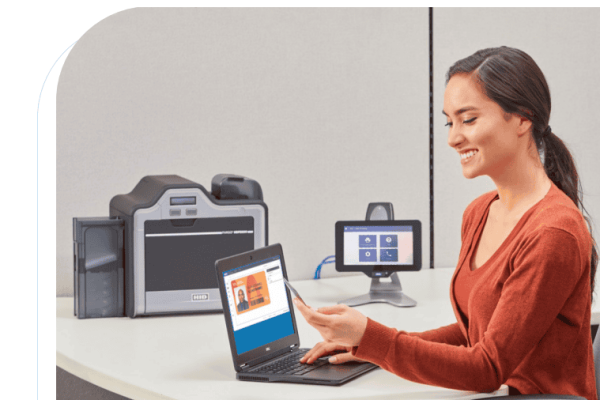
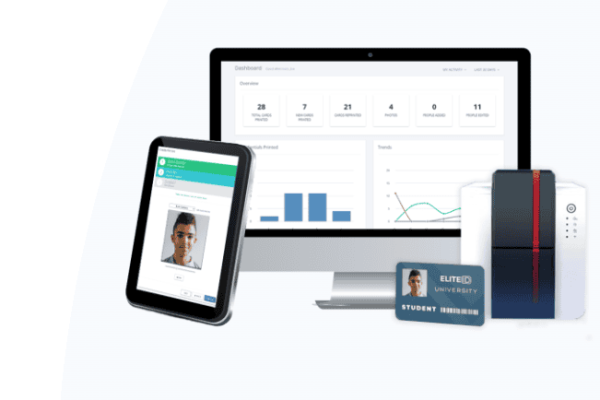
In today’s world, where security for organizations has become so critical, having a reliable and efficient ID badging system is imperative for managing day-to-day operations. EliteID, a cloud-based ID badging solution offered by IDentiphoto, is an innovative solution that brings card issuance to the cloud. This cloud-based solution offers numerous benefits that traditional badging software programs lack. Let’s explore the features and advantages of EliteID.

Accessibility
One of the key benefits of EliteID is its accessibility from anywhere. With EliteID, users can access the system from any device, including PCs, laptops, and mobile devices. This flexibility provides users with the ability to manage their card issuance needs from anywhere, anytime.

Automated Updates

Another major advantage of EliteID is its automated updates, which happen in real-time. This means that users always have the latest features and functionalities without worrying about managing updates themselves. Additionally, because EliteID is a cloud-based solution, there is no need for local installations, which reduces the system footprint and streamlines resource management.

Guided Enrollment

The guided enrollment workflow is another feature of EliteID that makes it stand out from traditional badging software programs. This feature ensures that all the required information and ID photos are collected before the ID is printed. This process reduces the possibility of errors and ensures that the ID card meets all the necessary requirements.

Category “Lists”

The powerful “Lists” feature of EliteID is another standout feature. This feature allows users to categorize people in the database based on the information they know about them. Users can create dynamic lists, such as “Enrollees without Photos,” and batch print them or quickly attach ID photos. The subscription includes as many card templates, person records, and prints as needed, which is another advantage over other badging solutions that charge by the number of records.

WYSIWYG Card Designer

EliteID also comes with an easy-to-use drag-and-drop card designer included with every license. Users can create professional ID cards in just a few minutes, without the need for any design experience. The system’s web-based ID card designer can be accessed from anywhere by logging into the user’s portal.

Additional key features of EliteID include customizable labels and titles for data fields, support for jpg and png image formats, dynamic color and visibility based on database information, support for 1D barcode and QR code, and preferred name integration with 19 different name field combinations.

In addition to these features, EliteID has a powerful dashboard and reporting features, supports imports and exports, and allows for photo capture from a desktop client or a mobile device. This feature is especially useful for organizations that require photos to be taken in the field or at remote locations.

To get started with EliteID, users will need an ID badge printer and a webcam bundle, which is a small investment compared to the benefits that the system provides. With EliteID, organizations can enjoy the convenience, flexibility, and efficiency of a cloud-based ID badging solution that is packed with features and functionalities to streamline their ID card issuance processes.

In conclusion, EliteID is an innovative cloud-based ID badging solution that provides users with numerous benefits that traditional badging software programs lack. The system’s accessibility from anywhere, automated updates, guided enrollment workflow, powerful “Lists” feature, and easy-to-use drag-and-drop card designer are just some of the features that make it stand out from the competition. Additionally, EliteID has a range of additional features that make it an ideal solution for organizations that need to issue ID cards reliably and efficiently.

Not sure where to begin? We have a team of experts that are here to help. Whether you’re a small business with few employees or a corporation looking to issue new secure ID cards for a large number of people, we can help.

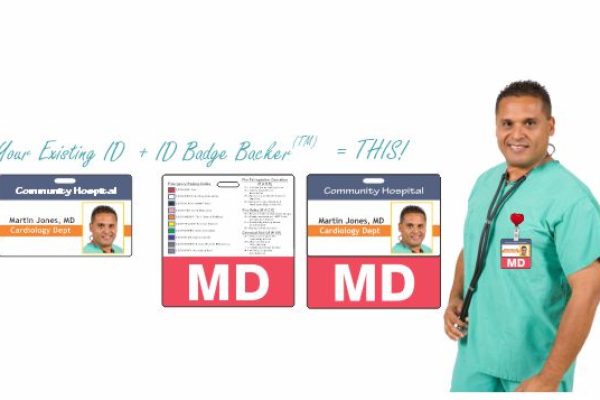
Badge backers are a valuable accessory for anyone who uses an ID badge as a form of identification. These customizable backers use a badge clip to hang behind an employee ID badge. The primary purpose for badge backers is that the employee’s designation (title) is boldly and prominently displayed for clients and staff. 

One of the main benefits of using badge backers is that they make it easier to identify the department or title of the badge wearer from a greater distance. For example, it’s not always easy to read the fine print on an ID badge. Badge backers feature larger text and/or imagery that clearly indicates the wearer’s role, credentials, or other important information. This can be especially useful in large organizations where there may be multiple people present with the same or similar titles. Another benefit of badge backers is they can be color-coded by department or other categories, making it easier to identify the roles and responsibilities of different individuals within an organization.

In addition to identifying the department or title of the badge wearer, badge backers can also be used to keep personnel informed about important information or updates. Many organizations that implement badge backers utilize the area behind the ID card to print a message or other information such as an emergency code card in the hospital environment.

IDentiphoto’s graphics department specializes in creating custom designs so an organization can print valuable information in this area such as but not limited to, emergency procedures, mission and vision statements, essential phone numbers, compliance requirements, and best practices. Including this information on a badge backer also eliminates the need for carrying other cards, which can save your organization money while streamlining your ordering process.

Badge backers are fully customizable and can be tailored to meet the specific needs and preferences of your organization. IDentiphoto also offers low minimum order quantitiesas low as 6, 9, or 12 count—making it easy to order a small batch of custom-designed badge backers for a specific department or role.

Overall, badge backers are a simple but effective tool that can help to improve communication, safety, and security within organizations. Whether you work in a hospital, school, or any other organization, a badge backer is a valuable addition to your ID badge program.

IDentiphoto is a full-service dealer that can provide all the components you need to set up or maintain your ID program. If you are not familiar with the ID production process, you will need ID Personalization Software, an ID Badge PrinterPrinter Ribbon, ID Cards to print on, and a Photo Capture Device if you plan to include pictures on your badges to get started.
Not sure where to begin? We highly recommend working with one of our experts because ID Badge Backers are completely customizable to meet your needs.

Contact an ID Consultant Today

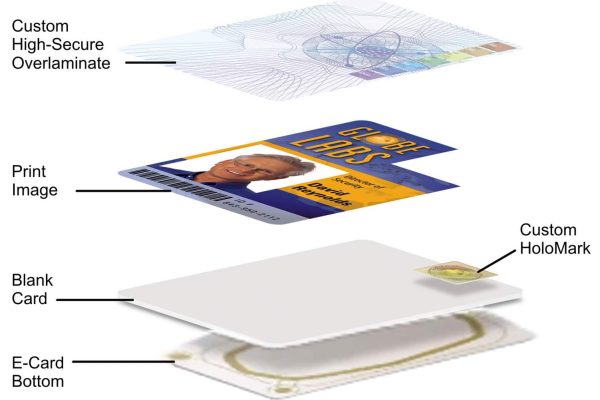
A secure ID card is a form of identification that is designed to be difficult to forge or counterfeit. It typically contains personal information about the individual, such as their name, job title, and unique identifier, as well as a photograph or other biometric data. Secure ID cards are used for a variety of purposes, including verifying the identity of an individual for security reasons, access control, and financial transactions.

One of the main benefits of a secure ID card is that it provides a reliable and easy way to verify an individual’s identity. This is important for a variety of reasons, such as when accessing secure facilities or verifying someone’s eligibility for certain services. By using a secure ID card, organizations can quickly and easily confirm that an individual is who they claim to be.

Another benefit of a secure ID card is that it can help to improve security and access control. By requiring individuals to present a secure ID card to enter a secure facility, organizations can ensure that only authorized individuals have access to sensitive areas or information. This can help to prevent unauthorized access, which can have serious consequences in terms of data breaches or other incidents.

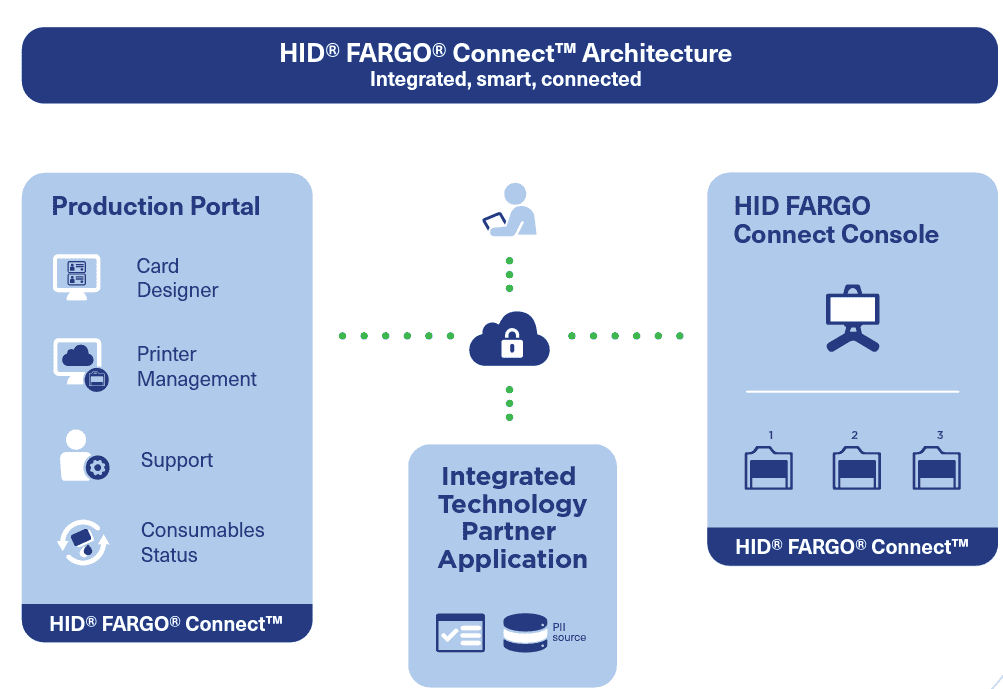
In addition to improving security, a secure ID card can also help to streamline various processes and make them more efficient. For example, by using a secure ID card issuance process for access control systems, organizations can eliminate errors associated with manual processes. This also allows the organizations to program their ID cards on demand versus having programmed stock on the shelves. Solutions like HID Fargo Connect are ideal for organizations that have the highest security standards. 

Overall, a secure ID card can provide a range of benefits, including improved security, more efficient processes, and the ability to easily verify an individual’s identity. By implementing a secure ID card system, organizations can help to protect against fraud and ensure that only authorized individuals have access to sensitive areas or information.

Not sure where to begin? We have a team of experts that are here to help you decide which solution best fits your business needs. Whether you’re a small business with few employees or a corporation looking to issue new secure ID cards for a large number of people, we can help.

As businesses continue to evolve their technology, we have been receiving more and more inquiries about cloud-based software solutions, specifically on the ID Badging and Visitor Management fronts. What we’re discovering is that many companies need a brief explanation of what the cloud is, why it’s beneficial, and whether it applies to their day-to-day operations.

Many companies are operating using on-premise software, which means the software is installed on a company’s own servers and behind its firewall. For a long time, it was the only offering for organizations and may continue to adequately serve the company’s business needs. As they say, “if it isn’t broke, don’t fix it.”

However, there’s agreement among IT decision-makers that in addition to operating locally installed software and legacy systems, there’s an opportunity to leverage new cloud and SaaS applications to achieve their business goals.

According to SoftwareAdvice.com, 60% of software seekers are looking for Web-based products only (cloud)—less than 2% specifically ask for on-premise software.

Before we dive into the considerations of switching to cloud-based, let’s look at the basic high-level definition.

What is The Cloud?

In its simplest terms, “The Cloud” refers to software and services that run on the Internet instead of locally on your computer’s hard drive. Instead of storing and accessing data on-premise only, it allows for access by simply using a Web browser.

What does “On-Premise” mean?

Unlike the cloud, on-premise software is licensed and resides on an organization’s hard drive or server and is usually kept within the four walls of an organization­—or in a remote location where servers are housed. On-premise is sometimes referred to as “local” software.

Some vendors also offer “hybrid” options, in which cloud software is hosted on an organization’s private servers.

On Premise vs. Cloud Considerations

There are three things to consider when choosing between on-premise software and cloud-based software: Security, Cost, and Data Storage.

Security

Perhaps the leading reason companies decide to choose or maintain on-premise software is security. With on-prem, the software is licensed, allowing enterprises to maintain a level of control that cloud often cannot. Knowing your data and infrastructure is located in-house certainly brings peace of mind.

However, if your device is stolen or lost, your information on the local drive can be compromised. Additionally, viruses and malware can destroy the data on your hard drive or be spread throughout network files.

Due to publicized cloud breaches, security concerns are typically the number one barrier to the cloud and a real concern for IT departments. However, the time saved with configuration and the low cost of cloud software typically outweigh the security concerns.

Cost

Another consideration when selecting cloud versus an on-premise solution is how they are priced. While there are certainly exceptions, for the most part, cloud software is priced under a monthly or annual subscription. Cloud software can also include additional recurring fees for support, training, and updates.

As we mentioned previously, on-premise software is licensed, which means it is generally priced under a one-time perpetual license fee. The fee is usually based on the size of the organization or the number of concurrent users. On-premise software may also include additional fees for support, training, and updates.

Because of these differences, on-premise systems are usually considered a capital expenditure, meaning one large investment upfront. A cloud solution is typically considered an operating expenditure, meaning an additional overhead cost the organization will continue to pay. Over time, these system costs tend to converge creating an even total cost of ownership. See the chart below provided by Software Advice.

Data Storage

One of the most attractive benefits of having a local software solution is that enterprises retain all their data and are fully in control of what happens to it. Also, no Internet connection is needed to access your stored data and local storage is the quickest way to store and access your data files.

The advantages of having cloud-based data storage are readily apparent—you can access your data from any device, anywhere, and sharing your files is easier in a cloud service, making it easier to grant access to colleagues if you’re collaborating on a project or task.

Other benefits of the cloud include reducing hardware costs (you don’t have to buy added drives, file servers, etc.) and your data is less subject to hardware crashes or computer damages. The cloud is responsible for their environment.

Ultimately, our goal is to ensure that whatever solution your organization chooses, it is the right fit for your business and its ongoing needs. IDentiphoto’s ID Specialists are ready to help you find the software program that best fits your needs; one that can grow with your company. If you’re interested in discussing the latest Cloud-Based ID and Badging Solutions, please reach out to us at sales@identiphoto.com or give us a call at 800-860-9111.